


Robinhood began as a trading app, enabling users to buy and sell stocks. It has since evolved into a comprehensive financial app, offering a range of products, including prediction event market contracts. The prediction market side just makes up part of the overall Robinhood Deritatives group. The prediction markets are just one of the many Robinhood services available on the app.
In this review, we will cover all of the key information related to Robinhood prediction markets, including new customer offers, range of markets available, banking options and fees, how to get started, and more.
What Users Are Saying About Robinhood
| Positive Feedback | Negative Feedback |
|---|---|
| Brilliant platform. Easy to navigate and super slick | It’s a nightmare trying to get my money out they keep restricting my account |
| Its been great, above expectation | I had a very unpleasant experience with the Robinhood cryptocurrency exchange |
| Quick deposits no blocks or restrictions on trading | Customer service is horrible, I have trouble logging in to my account all the time |
| I haven’t had any trouble with deposits or withdrawals, would absolutely recommend | Very slow to transfer money into account |
What is Robinhood?
Robinhood is primarily known as a trading app, but has recently made a move into the prediction markets space. Since the company made the decision, it has teamed up with Kalshi to offer event contracts in football on its app. These football markets cover both the NFL and the college game, and users can access these markets via the app’s ‘predictions hub’.
This move emphasizes that Robinhood wants to be known as an all-around exchange for prediction contracts, rather than simply a trader. Due to its partnerships with Kalshi and Susquehanna, Robinhood customers can trade event-based contracts on the app.
How Does Robinhood Work?
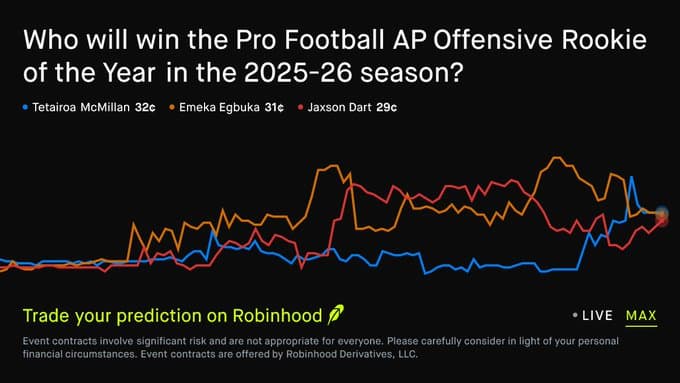
Robinhood has said that prediction markets have exploded in growth recently, which is a major reason it has expanded its categories to include sports, culture, economics, and politics. Users can trade on the outcome of real-world events, such as a presidential race or an NFL game, using events contracts. Every contract is based on a decisive outcome that will be decided in the future.
To access the prediction markets on the Robinhood app, sign in to your account and head to the predictions hub. You can then participate in the various markets and buy a ‘yes’ or ‘no’ contract. The prices usually range from $0.01 to $0.99 per contract. The price on this and other prediction market sites reflects the market’s opinion on the likelihood of an event occurring.
Buying and Selling Contracts at Robinhood
To enter the prediction markets and trade contracts at Robinhood, you will need to have an approved Robinhood Derivatives account. You also must be a US citizen, and your individual account needs to have either ‘options trading approved (level 2 or 3), or ‘margin invested enabled’.
If you are a user who doesn’t have those necessary boxes ticked, you can do this on the app. Log in to your account, enter ‘futures trading’ in the search bar, and then click continue to apply for a Robinhood Derivatives account. You will then be given a set of instructions that are simple to complete.
This whole process takes only a few minutes, and once you are approved, head to the investing menu and scroll to the ‘trade events contracts’ button. You will then be taken to a screen where you can view all of the available prediction markets.
You can get a more detailed breakdown of any contract you are interested in, such as when it will be resolved, by clicking on the name. If you like the look of it and are ready to trade, click the ‘yes’ or ‘no’ button. Finally, enter the number of contracts you want to purchase, check the order to ensure everything is accurate, and then submit.
While it is an easy process to trade contracts on Robinhood, it lacks a bit of detail compared to Kalshi and Polymarket. The fact that there is no way for users to view the contract trading volume is a big miss for us, and something we would like to see added in the future.
Available Markets on Robinhood
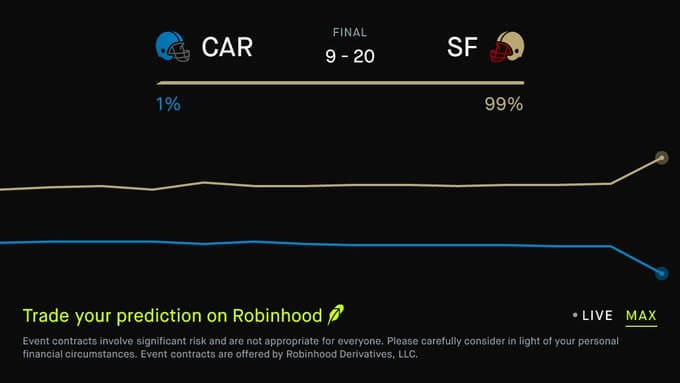
Robinhood has a wide range of markets to choose from. Because of its partnership with Kalshi, the type of markets will look familiar to anyone who has traded contracts on the Kalshi app. However, the markets on Robinhood aren’t as varied yet as on Kalshi or Polymarket, likely due to the fact that Robinhood is very new to the predictions market industry. We would expect this list to grow further in the next few months.
- Sports
- Politics
- Economics
- Crupto
- Entertainment
- Esports
- Financial
- Technology
The current number of sports available on Robinhood is limited, but now that they have teamed up with Kalshi, we presume they will soon have the same amount of sports that you will find on the Kalshi app. You can currently trade contracts on the following sports on Robinhood:
- NFL
- NBA
- MLB
- NHL
- College football
- College basketball
- Soccer
- Tennis
- Motorsports
You can also access more sports depending on the time of the year.
Robinhood Fees
The top price on Robinhood contracts is $1. Customers pay between $0.01 and $0.99, and the contracts settle at one dollar. Robinhood does charge a 1-cent commission per contract purchased or sold. If you decide to buy a contract, then sell it before it finishes, you must pay the commission for each subsequent transaction, not just when you initially purchased the contract. If you hold the contract for the entire length of its duration, you will only pay the commission once.
There are no other trading fees on Robinhood. You may come across additional fees charged by the exchange that processes the contract, and those fees will be viewable during the purchasing process. Any additional fees that the customer doesn’t pay are spreads included in the set contract price. For example, if you see a yes contract at 83% and a no contract at 20%, that makes 103, not 100. That extra 2% goes to the exchange.
Banking
There are only three available payment options to choose from on the Robinhood app. You can transfer funds from your bank account via a debit card, wire transfer, or ACH eCheck. There are no fees attached to deposits when using any of these payment methods.
You can withdraw funds from your Robinhood account to your bank account using the same banking options as above. If you withdraw to your debit card, the funds will arrive instantly, but do incur up to a 1.75% fee. Also, please be aware that you can only withdraw funds using the same option you used to make a deposit.
Customer Support
Robinhood has plenty of resources available for all of its services. These resources help explain a range of things, from how to get up and running on the app to taxes and how to trade. We have found that the majority of questions can be answered by visiting the help center.
If you can’t find what you are looking for in the help center, you can contact Robinhood directly via the following options:
- Email: support@Robinhood.com
- Live chat: 24/7 available on both app and desktop
- Phone: No direct dial, but can request a callback via web or app support
- Social media: X, Facebook, Instagram, LinkedIn, Discord
We would always recommend using the live chat feature if you want your issue resolved quickly. You get put through to customer agents after about 30 seconds of answering bot questions. If you are willing to wait a little longer, send an email or a direct message via one of Robinhood’s social media platforms.
Our Verdict
Robinhood is a safe, regulated platform that has joined forces with Kalshi to improve its event contract services. This is an extra to its existing products on the app. Although Robinhood now has prediction markets, it is still primarily a trading app. If you have no interest in trading stocks, we would recommend using Polymarket, Kalshi, or Crypto.com. There are more markets on those sites and navigation is far more simple.
But, if you want to continue trading stocks but also would like to start trading on real-world events as well, then Robinhood is worth checking out.




 Loading...